
Aadhaar
Services
ELCOT is one of the agencies empanelled by the Unique Identification Authority of India (UIDAI) to execute Aadhaar enrollment and updation activities. ELCOT has established 376 PECs (Permanent Enrollment Centre) across the State of Tamil Nadu for providing Aadhaar-related services to the citizens.

ELCOT has been operating Permanent Enrolment Centres (PECs) across Tamil Nadu since October 2016, providing accessible Aadhaar enrolment and update services to citizens. Currently, 376 PECs are functioning across the State, covering District Collectorates, Municipal Corporation Headquarters, Municipal Zonal Offices, Municipalities, Corporation Divisional Offices, Town Panchayats, Revenue Divisional Offices, Block Development Offices, Village Panchayats and other government offices. During the financial year 2025–2026, ELCOT successfully facilitated 23.6 lakh Aadhaar-related transactions. In addition, since November 2025, ELCOT, as an Aadhaar Registrar, has been conducting enrolment and update camps for school students under the “Aadhaar Through Schools” initiative at school premises across all districts of Tamil Nadu. Through this initiative, 3.23 lakh Aadhaar-related transactions have been successfully completed, further enhancing the accessibility of Aadhaar services for students across the State.
ELCOT and TACTV Aadhaar Centres List
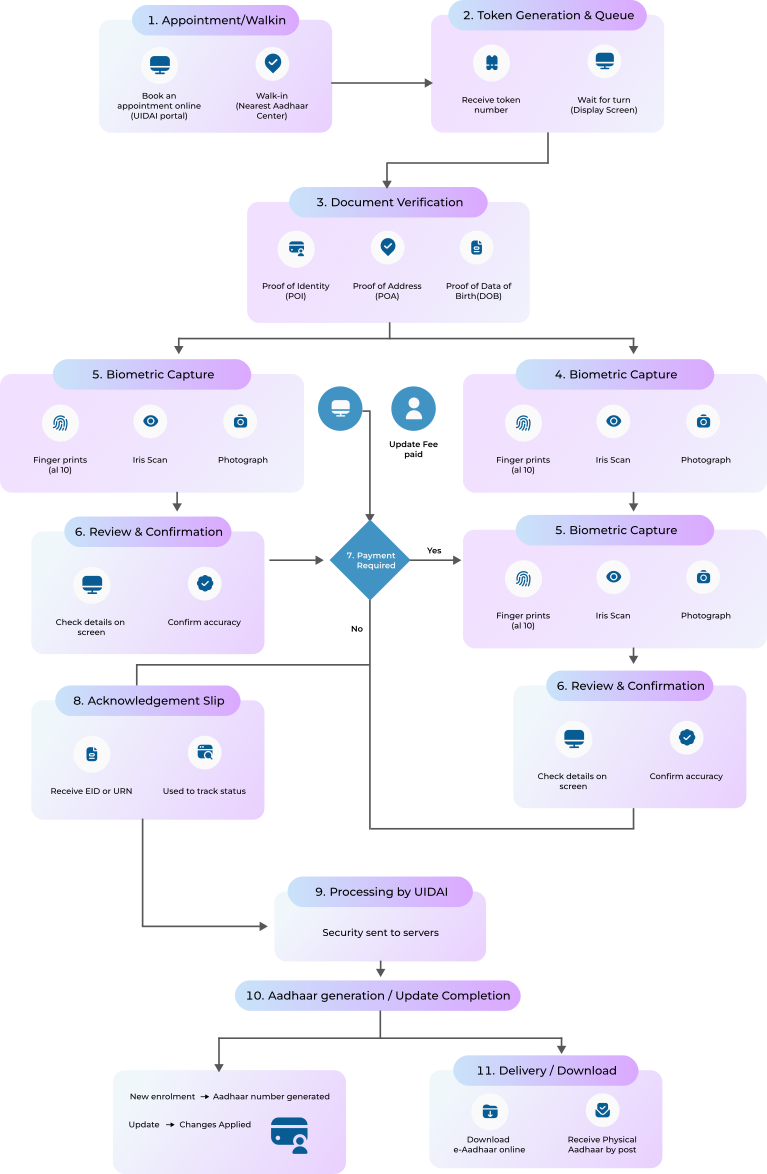
Aadhaar Work Progress
1. Appointment / Walk-in
You can either:
- Book an appointment online via the UIDAI portal
- Walk-in to the nearest Aadhaar Center
2. Token Generation & Queue
At the center:
- You receive a token number
- Wait for your turn (display screens announce tokens)
3. Document Verification
Submit required documents:
- Proof of Identity (POI)
- Proof of Address (POA)
- Proof of Date of Birth (DOB) (if needed)
- The operator verifies originals
4. Data Entry / Update
Operator enters or updates details:
- Name
- Address
- Mobile number
- DOB, gender, etc.
5. Biometric Capture
Mandatory for most services:
- Fingerprints (all 10)
- Iris scan
- Photograph
6. Review & Confirmation
- You check your details on screen
- Confirm accuracy before submission
7. Payment (if applicable)
Charges depend on service:
- New Aadhaar enrolment → Free
- Updates → Demographic (₹75), Biometric (₹125)
8. Acknowledgement Slip
- You receive an Enrollment ID (EID) or Update Request Number (URN)
- This is used to track status
9. Processing by UIDAI
Data is securely sent to UIDAI servers. Goes through:
- Quality check
- De-duplication (to avoid duplicates)
10. Aadhaar Generation / Update Completion
- If new: Aadhaar number is generated
- If update: Changes are applied
11. Delivery / Download
You can:
- Download e-Aadhaar online
- Or receive it by post